


Intro
I want to start by saying that I’m neither an AI-fanatic, nor an AI-doomer and you can read about my conflicted relationships with it in my previous article. What I really like, is creating something and I’ve come to terms with the fact that it’s impossible to create anything, before making a mess first. And as any tool, AI-assisted development, and Claude Code in particular require usage to figure our possibilities, limitations and finding “my” flow.
Plenty of people are already writing about how to use Claude Code well (some references below) and today I’m sharing how I originally started with Claude Code and how it looks now, before I forgot all the steps in-between. Because once you are in the tunnel of automation, you get that vision...what was it called... ah yeah tunnel :)
Phase 0 - Tabs of Terminals
So at first it was a now-simple “synchronous” session with Claude Code on my local, where we would brainstorm together in an active session, implementing it in an active session, then reviewing the result PR(s) and then merging it at my own time. A lot of Claude.md files, a lot of generally .md files with notes and memories of things I found important. Skills, MCPs, sub-agents - all useful elements to make particular task at hand easier.
Then, of course, there were moments of waiting, and in the moments I was waiting, I started opening multiple windows and chatting about multiple features that can be worked in parallel. More leveraging of worktrees (although took some steps to make it work for multiple repos together) and even sometimes working on different projects at the same time so that the implementations don’t overlap. Same multi-tab craziness that has become meme-worthy.
Here superpowers plugin has been really helpful, with the workflow of brainstorming -> spec -> plan -> implementations. Give that a couple of extra subagents to focus on review, testing, and instruct it to “follow task the plan and tick it off tasks one by one” and you have a pretty good automation. A lot of what Lina Edwards wrote in her Be the Gate piece helped acknowledge that brainstorming, spec creation, plan creation, implementation, review, etc - all need their own context, so they don’t influence each other in a wrong way. In the meantime, Claude Code itself has gotten better at this to be fair.
I was quite happy at first, you know? I took the satisfaction of development during brainstorming and then waited for the “boring” parts to be done by AI.
But of course then came the context-switch fatigue. There could be only 2-3 features I could be really attentive about and not just mindlessly choose “yes”, “yes”, “yes”, “looks good, go ahead”. Ah and I forgot to say that I wasn’t very trusting, so I had to press enter a lot of times DURING the implementation as well.
Around this time OpenClaw/Clawdbot/Moltbot came out, which I honestly hated(yes, without trying...) and dreaded to try because of the enormous amount of security scares. A lot of the “accepting” that such thing exists and is popular came also with AWS making it a one-click deployment on Lightsail..so essentially “trusting” it enough to make it usable for their customers. (BTW Tobias Schmidt wrote about it and he is generally who I find myself getting my AWS news lately from)
I also had several enlightening conversations with Sergey Rysev, who pushed me to “take myself out of the equation”, because it’s impossible to sustain the load of following every single detail that is being done on those 3-4 terminal windows. And I think for people coming from longer management experience, it’s sometimes even easier to leverage AI-tools “smarter”, because they have learned how and what to delegate over so many years, with humans. So it took me a while, but I decided to try to “take myself out of the equation”, while attempting to stay as secure as possible.
So I took an EC2 instance, set up an SSM connection to it, and decided to only use Claude Code native ways (so I also stay within legal realm of using claude credentials), and started to work my way to “removing” myself.
The rest of this article is the diary of how that workflow evolved, in roughly the order it actually happened. Nothing here is “the” answer. And is not an encouragement to follow :D
Phase 1 - Let’s Get Out of Local Machine
The first move was small and frustrating. Since I found myself clicking enter way too many times during the implementation, that part had to go into automated mode, but in order to trust claude code in “allow all changes” model, I wanted to at least reduce the blast radius of things that could go wrong, by isolating and moving project specific things to a single ec2. Funny how in order to go faster, one has to think about security and actually slow down.
The move revealed how the context of one repository had leaked into another, how my CLAUDE.md files, and other memory/skill/direction MD files have been too inter-connected and messy. I felt slower again, and I felt claude “being stupid” again just because it was missing context of previous conversations (I didn’t migrate those to new EC2).
But yeah, automation makes you slower at first. Plus this gave me some peace of mind that the blast radius of things that can go wrong is at least now scoped to a single project, instead of my whole developer machine.
I did have a lot of struggles with the sandbox mode, and I still don’t have peace of mind regarding possible leaking credentials, but that’s another story and a lot of people now are working on “Agent-env-as-a-service” environments. And making secure virtual envs for that (latest opensource one I saw was from Artavazd Balaian) - that’s not the point here. The point is to go through it yourself and understand how thing works FOR YOU ! :)
Eventually I came to this flow:
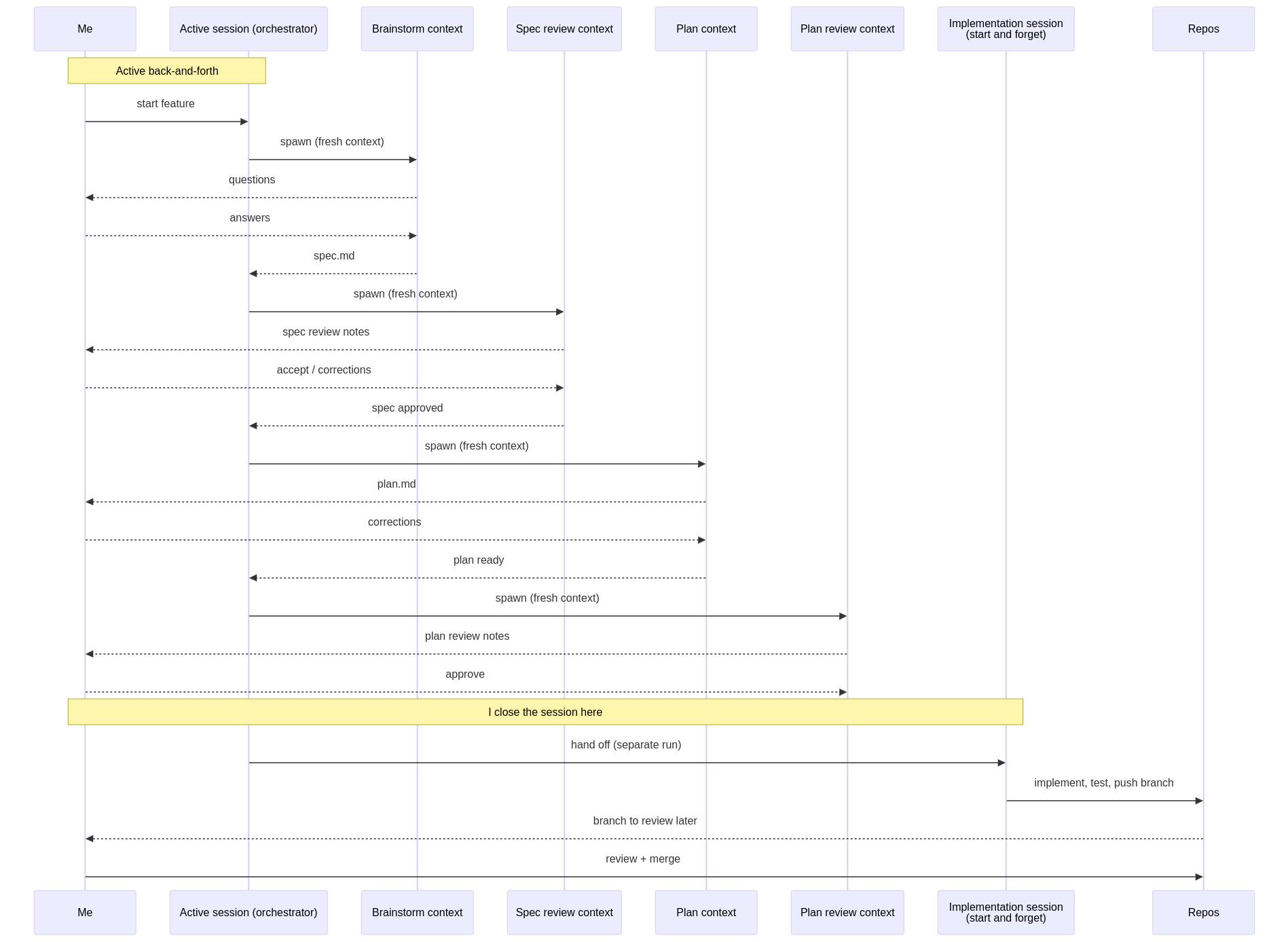
The win was the time not watching it implement what we already brainstormed and planned thoroughly and the cleaned “not-on-my-local” state.
Phase 2 - Let’s Make it Work Stand-alone
For a while I tried to keep an interactive session open to the EC2 instance from my phone, through a remote terminal. That worked technically. It didn’t work for me as a human. Two reasons:
I wanted claude code to run on a schedule - exactly removing myself from the loop. An interactive session over a phone is the opposite of that. It still requires me to babysit.
When I’m not at the computer, I don’t want to be working. Even if “working” is just glancing at a chat with claude. If I’m going to delegate, I want to delegate. Not get a Slack-like trickle of questions all evening.
So I gave up on the phone idea pretty quickly and started thinking about the problem differently. What I actually wanted was a checkpoint-style communication: claude does a chunk of work, leaves me a clear artifact and a clear question, and I come back to it the next morning on my own terms.
That meant I needed:
A persistent place to store state between runs (because the session ends, but the work shouldn’t reset).
A way for the schedule to know “what to pick up next” without me having to tell it.
Clear “stops” where the AI hands work back to me, with enough context that I can answer in 5 minutes instead of re-loading the whole problem.
I didn’t have any of that yet. I just had a skill that could implement things if I babysat it. I really wanted a “PROCESS”.
Phase 3 - GitHub as the Board
After some attempts to make it work through .MD files and daemons reading those, and piggy-backing on our conversations with Sergey again, who mentioned “giving his agents a planning board to work with”, I handed over that to a github issue tracker. (to be honest I thought of JIRA, but Atlassian MCP is very “heavy” and with github applications I have short-lived credentials I can use to at least yeah, again, lower the blast radius).
GitHub issues turned out to be a surprisingly good fit. They have:
Labels - perfect for state machines.
Comments - great for “the daemon left you a note”.
A clean web UI I can read on a train.
A CLI (
gh) that scripts well from a cron job.
So I migrated the workflow onto GitHub. A backlog repo holds issues; each issue’s labels represent its phase; spec/plan artifacts live in a dedicated specs/issue-N/ directory in that same repo. The skill became /feature-gh, which knows how to:
Brainstorm (interactively) starting from an issue number.
Run spec review, plan creation, plan review as isolated subagent passes.
Stop at hard gates and wait for me to flip a label.
Resume from
state.jsonif interrupted.At the very end, merge the per-repo feature branches into base branches when I tell it to.
The important property is that each phase has its own context window. The brainstorm subagent doesn’t see the implementation noise. The reviewer doesn’t see the brainstorm rambling. This was the bit Lina Edwards wrote about that I had been ignoring at my own expense - keeping one giant chat for everything makes the AI worse, not better.
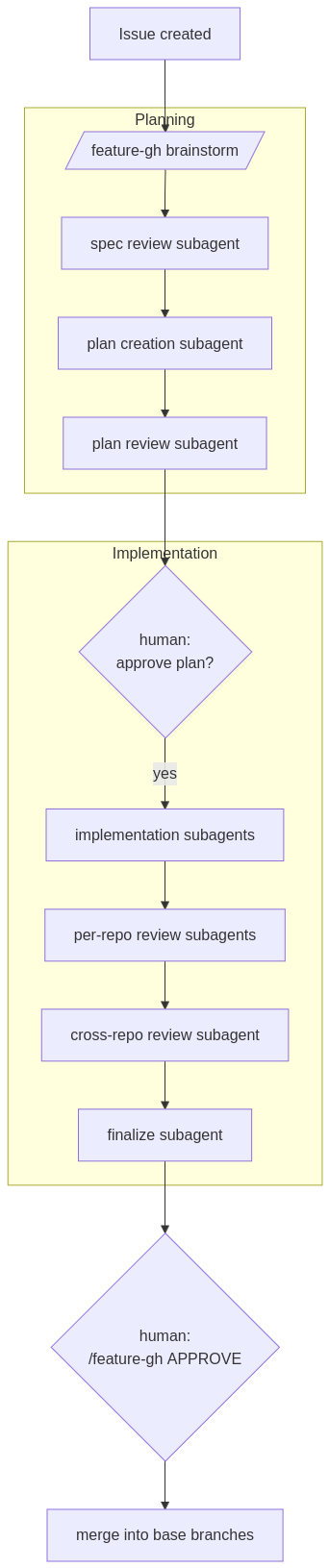
At this point everything still ran when I typed a command. The skill was good, the labels were honest, but I was still pressing the buttons.
Phase 4 - Daemon First Version
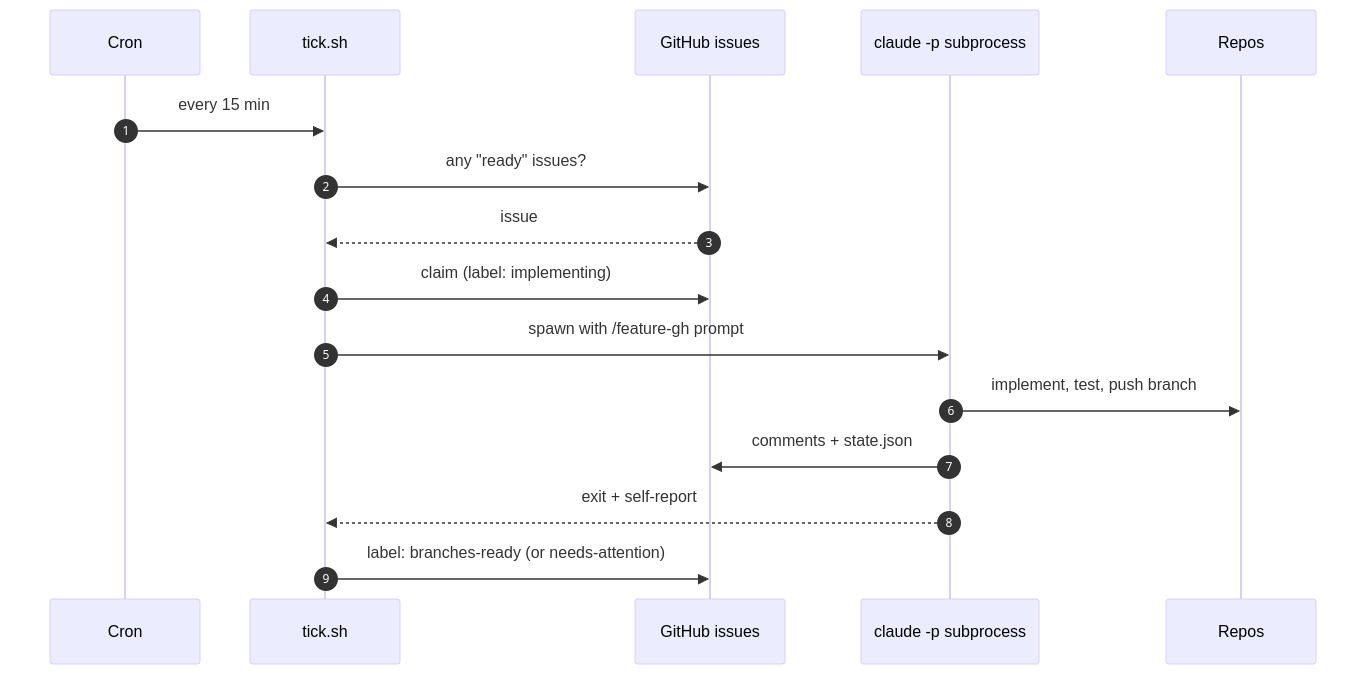
Without ever using OpenClaw I came to the same conclusion I need a tick.sh. It is a small bash script that runs on cron every 15 minutes on the EC2 instance. It does roughly this:
Take a lock so two ticks can’t run on top of each other.
Refresh the gh token if it expired, pull the backlog repo.
Look for issues that have been stuck on a “daemon working” label too long, and reset them to retry.
Find the oldest issue labeled
ready. If none, exit.Claim it (swap the label, leave a comment).
Spawn
claude -pnon-interactively with a prompt that says “implement this feature using/feature-gh“.Wait. When the subprocess exits, look at what it wrote, decide whether it succeeded, hit a rate limit, or died.
Update the issue label accordingly:
branches-ready, leave it onimplementingto resume next tick, or flip toneeds-attention.
That’s it. Dumb on purpose. The actual intelligence of the implementation is inside the Claude subprocess running /feature-gh. The shell script is just a babysitter.
Phase 5 - Actually Using it
For a while my role looked like this. I would have an active session in front of me. I’d brainstorm a feature with claude, write the spec, write or accept the plan, get to the point where everything was approved and the issue was at ready. Then I’d close the laptop. The next morning I’d open GitHub and read what had happened overnight.
The morning routine was something like:
Scan for
needs-attention(something broke - read the comment, decide if it’s worth retrying or fixing manually).Scan for
branches-ready(overnight implementation done - pull the branches, look at the diff, decide if it’s good).Add the
mergelabel to the ones I’m happy with.Queue up the next batch for the upcoming night.
This was the first time it really felt different from my old workflow. The night-time was used to code the features. The day-time to review and think about them. Of course there was a lot of back and forth on putting in the safety failures on claude being out of tokens, and a lot of time spent on developing the process itself. And you know, every time you make a change, you have to test it again. Was I more productive? It didn’t feel that way, because of the delayes between thinking about a feature, and seeing it work. But it was definitely helping me cleanup the endlessly growing smaller items from the backlog.
I still don’t think this part scales infinitely. The bottleneck just shifts. I went from “I don’t have time to write the code” to “I don’t have time to brainstorm and review thoroughly enough”, which is, honestly, a more productive bottleneck for me to be against. But it’s still a bottleneck. (Or load bearing wall. Seriously, from now on those two terms are just the same for me.).
Phase 6 - pre-context-gathering (enrichment)
The next thing to bother me was that the brainstorming step was eating my morning. A lot of the brainstorm conversation was claude asking me things I either didn’t know yet or could have looked up by reading the existing code and docs. So I added another daemon pass: an enrichment step.
The idea is small: I open a GitHub issue with one or two sentences. I label it needs-enrichment. The daemon picks it up on its next tick and runs a separate claude session whose only job is to expand that brief - read the relevant parts of the codebase, find prior art for similar features, surface the questions that are likely to come up, and rewrite the issue body with all of that context.
Then it stops, leaving the issue on enrichment:needs-review for me. I read the rewritten body in the morning. If it looks reasonable, I remove the review label and decide whether to push it further automatically, or to brainstorm interactively from there with the now much-richer issue body.
Practically what this gave me: brainstorming sessions in the morning that started from “here’s the code area, here’s prior art, here are the open questions” instead of “tell me about your project”. Context-gathering had been moved from human time to background time.

Phase 7 - what if I let it auto-brainstorm too?
This is the step I was most cautious about. Brainstorming is where you decide what the feature actually is. Delegating it feels like delegating thinking, which I really don’t want to do. So I added it carefully.
The auto-brainstorm pass only runs if I explicitly opt in by labeling the issue. It produces three artifacts:
A frozen baseline spec (a snapshot of what claude originally drafted).
An editable working spec.
A “brainstorm log” - a Q&A receipt for every section, with a confidence level and a source for each answer. Low-confidence answers are flagged.
That brainstorm log is the bit that earned my trust. It means I can scan the simulated brainstorm in a few minutes and see exactly where the model was guessing, what it was guessing based on, and where I disagree. I either accept the spec as-is, or open an interactive /continue-spec session to edit it, then flip the label to approved.
When I flip to approved, a third daemon pass kicks in: it distills my edits - diffs the editable spec against the frozen baseline, cross-references each change with the brainstorm log’s confidences, and writes the corrections both as principles for future runs and as the input to plan creation. Then it drafts a plan and a plan review, and stops.
So now there are three human gates left in the auto path:
Look at the enriched issue body and confirm it.
Look at the simulated spec and either accept or edit.
Look at the auto-drafted plan and either accept or edit.
Implementation and merge are still daemon-driven. If I never touch the merge step, it doesn’t happen - that one stays opt-in per issue, by adding a merge label after I’ve reviewed the diff.
Phase 8 - the Current State
The full happy path looks like this:

Five human touch points. So I am safe. Or so I think :)
When something fails - conflict, broken build, exhausted token budget, weird unrecoverable state - the daemon stops, labels the issue needs-attention, and leaves a comment with enough breadcrumbs (logs, recovery branch refs) for me to pick it up. That’s how I find out things broke. Not push notifications. Just an extra label in my morning triage.
What’s next
Honestly, I’m not sure if implementing things this way will take longer and cost more than actually sitting and f-in implementing that feature myself. The promise is, if you clone this workflow, you are endlessly productive. I don’t buy that quite myself yet. Same as I am bad at delegating to humans I think I’m bad at delegating to agents. But only time will tell...
Some things I see clearly will come:
QA is the next bottleneck. This was true before AI and it’s getting more true now. The daemon writes tests where the per-repo plan asks it to (TDD where the stack supports it), but the quality of those tests is uneven and they tend to over-mock. I expect the next batch of work to be around test design - reviewer agents that specifically look at what’s not being tested, integration coverage that doesn’t trust the unit suite, regression checks against real behavior. This is going to be the most expensive thing to get right.
More reviewer/cleanup agents. Right now the per-repo and cross-repo review passes are decent at catching obvious things and bad at catching subtle architectural drift. I want a tech-debt-suggester that looks at the whole repo over time, not just the diff. I want an architecture reviewer that knows what we’re trying to build and notices when a feature is being implemented against the grain. And I want a security review pass that’s actually thorough, not just lint-with-vibes.
Better Categorisation of features Some features are small and don’t require 100 different reviews and the orchestrator should be able to bucket them better and adjust the flow accordingly. Similarly, probably a separate bugfix flow makes sense.
More Meta And then one could go even more meta - an agent that suggest features itself. Suggest an order to implement them based on the isolation level it requires. But this is the “broken telephone” area Adrian Hornsby wrote about in his recent article.
A note before I sound too convinced
I want to be very clear about something. I remain a firm believer that one must not delegate thinking to AI. Even this much delegation, which is what I’ve described here, is dangerous. It will produce technical debt. It already does. Some of the tests this pipeline writes are bad. Some of the architectural choices it makes I have to fix myself.
The pipeline does not remove the need for static code analysis, code review, architecture review, recurring reworks to keep things clean, or security audits. If anything it makes those more important, because the rate at which mediocre code can land has gone up. The throughput is higher, the average quality is not.
I keep going because I want to see how far this goes - what’s still possible to delegate without crossing the line into “the model is doing the thinking and I’m just signing off”. I genuinely don’t know where that line is. I expect to find out by overshooting it at some point and walking back.
If anyone tells you with 100% confidence how AI must be used in your development process or organisation, run. They haven’t tried it themselves.
References
Besides the people who I already mentioned, I’d like to point you to following also Mae Capozzi (and frankly a lot of the Honeycomb team) who writes a lot about which skills and orchestrators are useful, and in which tasks AI-assistance has been successful, Sean Miller who often questions very hands-on how to use AI-assisted coding and Eric Lubow who writes a lot how it affects organisation dynamics in general.
Checkout the Part 2 as well:
Automating Myself Out of Development - part2

I had a hard time finishing this article to be honest. I couldn’t understand myself if what I was building is the right way or not. And so I sat on it for too long and forgot a lot of implementation details. So this one is going to be a bit messier, but there’s some “kern” in it, so if you will, bear with me, and let’s figure things out together.